Purpose
This page documents how nine fields were cleaned in processed.sites_nl_clean, the working copy made from raw.sites_nl_dirty (see the Competency 1 evidence for the raw import).
The goal was to find, measure and fix real problems in the data: messy categories, mixed date formats, duplicate keys, bad numbers, broken text encoding and mixed units. A record was also kept of why any value couldn’t be recovered, and the raw table was never touched.
The mistakes made along the way are included, because they are part of how the work was actually checked.
1. Working copy created from the raw table
Before any cleaning, a copy of the raw table was made so the original would stay untouched.
CREATE TABLE processed.sites_nl_clean AS
SELECT * FROM raw.sites_nl_dirty;
Finding
The copy was created. The geometry and CRS were not assumed to have come through correctly; that was checked separately in the next step.
2. Verification of copied geometry and CRS
SELECT ST_SRID(wkb_geometry), COUNT(*)
FROM processed.sites_nl_clean
GROUP BY ST_SRID(wkb_geometry);
Finding
The result matched the raw table exactly: 8 records with no geometry, 192 with SRID 4326. The copy kept the geometry and CRS intact.
3. category — standardisation
The raw category field was checked for distinct values first.
SELECT category, COUNT(*)
FROM raw.sites_nl_dirty
GROUP BY category
ORDER BY COUNT(*) DESC;
26 different values came back — far more than the 5 real categories.
Hidden whitespace was checked for with LENGTH(), since two values can look identical but differ by an invisible space:
SELECT category, LENGTH(category), COUNT(*)
FROM raw.sites_nl_dirty
GROUP BY category, LENGTH(category)
ORDER BY category, LENGTH(category);
This confirmed that some “different” categories were really the same word with extra spaces.
The cleaning logic was tested as a read-only query before anything was changed:
SELECT DISTINCT LOWER(TRIM(category)) AS cleaned, COUNT(*)
FROM raw.sites_nl_dirty
GROUP BY cleaned
ORDER BY COUNT(*) DESC;
This brought 26 raw values down to 10: the 5 real categories, 4 typos or translations (shool, winkel, hospitaal, parc), and 1 blank.
Next, a full before/after preview was run with no filter, so every row could be checked by eye:
SELECT
    id,
    category AS old_value,
    CASE
        WHEN TRIM(category) = ''                 THEN NULL
        WHEN LOWER(TRIM(category)) = 'shool'     THEN 'school'
        WHEN LOWER(TRIM(category)) = 'winkel'    THEN 'retail'
        WHEN LOWER(TRIM(category)) = 'hospitaal' THEN 'hospital'
        WHEN LOWER(TRIM(category)) = 'parc'      THEN 'park'
        ELSE LOWER(TRIM(category))
    END AS new_value
FROM raw.sites_nl_dirty
ORDER BY category;
Before anything was written, the three groups were checked to add up to the full row count:
SELECT COUNT(*) FROM raw.sites_nl_dirty
WHERE LOWER(TRIM(category)) IN ('school','retail','hospital','park','warehouse');
-- 161

SELECT COUNT(*) FROM raw.sites_nl_dirty
WHERE LOWER(TRIM(category)) IN ('shool','winkel','hospitaal','parc');
-- 23

SELECT COUNT(*) FROM raw.sites_nl_dirty
WHERE TRIM(category) = '';
-- 16
161 + 23 + 16 = 200, so nothing was left unaccounted for.
The fix itself:
UPDATE processed.sites_nl_clean
SET category = CASE
    WHEN TRIM(category) = ''                 THEN NULL
    WHEN LOWER(TRIM(category)) = 'shool'     THEN 'school'
    WHEN LOWER(TRIM(category)) = 'winkel'    THEN 'retail'
    WHEN LOWER(TRIM(category)) = 'hospitaal' THEN 'hospital'
    WHEN LOWER(TRIM(category)) = 'parc'      THEN 'park'
    ELSE LOWER(TRIM(category))
END;
Finding
The typos and casing were fixed, which left 5 clean values. The 16 blank values were set to NULL instead of being guessed. No other problems came up in this field.
4. date_collected — format standardisation and type conversion
First, every raw value was sorted into one of four expected date formats:
SELECT
    CASE
        WHEN date_collected = '' THEN 'blank'
        WHEN date_collected ~ '^\d{1,2}\.\d{1,2}\.\d{4}$' THEN 'dot'
        WHEN date_collected ~ '^\d{1,2}/\d{1,2}/\d{4}$'   THEN 'slash'
        WHEN date_collected ~ '^\d{4}-\d{1,2}-\d{1,2}$'   THEN 'dash_year_first'
        WHEN date_collected ~ '^\d{1,2}-\d{1,2}-\d{4}$'   THEN 'dash_year_last'
        ELSE 'UNMATCHED'
    END AS format_group,
    COUNT(*)
FROM raw.sites_nl_dirty
GROUP BY format_group
ORDER BY COUNT(*) DESC;
Then the column was converted:
ALTER TABLE processed.sites_nl_clean
ALTER COLUMN date_collected TYPE date
USING (
    CASE
        WHEN date_collected = '' THEN NULL
        WHEN date_collected ~ '^\d{1,2}\.\d{1,2}\.\d{4}$'
            THEN TO_DATE(date_collected, 'DD.MM.YYYY')
        WHEN date_collected ~ '^\d{1,2}/\d{1,2}/\d{4}$'
            THEN TO_DATE(date_collected, 'MM/DD/YYYY')
        WHEN date_collected ~ '^\d{4}-\d{1,2}-\d{1,2}$'
            THEN TO_DATE(date_collected, 'YYYY-MM-DD')
        WHEN date_collected ~ '^\d{1,2}-\d{1,2}-\d{4}$'
            THEN TO_DATE(date_collected, 'DD-MM-YYYY')
        ELSE NULL
    END
);
Mistakes made and fixed
- An early check labelled the dot-format pattern as
'slash'three separate times. This was found by comparing each regex to its own label, one by one. - The first format string for the slash group had day and month reversed (
'DD/MM/YYYY'used on a format that was actually month-first). This was found by working out the rule again from one real example (05/13/2023) instead of trusting the first guess. - The dot-format regex only expected two-digit days and months at first, so it missed cases like
3.4.2017. It was fixed to accept one or two digits.
Finding
Four date formats were standardised. Every row matched one of them (0 left over) before the column was converted from text to a real date type.
5. id — duplicate resolution
Duplicate id values were found:
SELECT id, COUNT(*)
FROM processed.sites_nl_clean
GROUP BY id
HAVING COUNT(*) > 1;
Instead of guessing correct id values, ogc_fid, a unique key created automatically at import, was used:
UPDATE processed.sites_nl_clean
SET id = ogc_fid::text
WHERE id IN (
    SELECT id
    FROM processed.sites_nl_clean
    GROUP BY id
    HAVING COUNT(*) > 1
);
Mistake made and fixed
This problem was first found by accident, while date_collected was being checked with a join on id. Because id had duplicates, one join produced 7 rows instead of 1 for id = 107, which looked at first like a date bug. The real cause only became clear when the join was made on ogc_fid instead, which correctly returned 200 rows.
Finding
A total of 21 rows with duplicate ids were fixed using ogc_fid. Running the fix again on already-correct rows changed nothing, as expected.
6. quantity — flagging and type conversion
A flag column was added first, to keep a record of why any value couldn’t be converted:
ALTER TABLE processed.sites_nl_clean
ADD COLUMN quantity_flag varchar(50);

UPDATE processed.sites_nl_clean
SET quantity_flag = CASE
    WHEN quantity = ''        THEN 'missing'
    WHEN quantity = '-'       THEN 'missing'
    WHEN quantity = 'n/a'     THEN 'not_applicable'
    WHEN quantity = 'unknown' THEN 'unknown'
    WHEN quantity = 'several' THEN 'several'
    ELSE NULL
END;

ALTER TABLE processed.sites_nl_clean
ALTER COLUMN quantity TYPE integer
USING (
    CASE
        WHEN quantity ~ '^[0-9]+$' THEN quantity::integer
        ELSE NULL
    END
);
A false alarm
At one point it looked like quantity had hidden whitespace or repeated rows, because the same value (4) seemed to show up more than once in a grouped list. A result grouped by two columns at once had been misread, so it wasn’t a data problem. LENGTH() confirmed there was no hidden whitespace, and grouping by quantity alone showed one row per value.
Finding
The bad values were flagged before the column was converted to a number type. Final result: 169 present, 31 missing.
7. price_eur — flagging, a mistake, and recovery
A flag column was added the same way as for quantity:
ALTER TABLE processed.sites_nl_clean
ADD COLUMN price_flag varchar(50);

UPDATE processed.sites_nl_clean
SET price_flag = CASE
    WHEN price_eur ~ '^-'         THEN 'invalid_negative'
    WHEN price_eur = '8991700.0'  THEN 'invalid_magnitude'
    ELSE NULL
END;
The mistake
The first attempt to convert the column used a rule that only accepted whole numbers with no decimal point:
-- WRONG — every value has a decimal point, so nothing matches
ALTER TABLE processed.sites_nl_clean
ALTER COLUMN price_eur TYPE numeric(10,2)
USING (
    CASE
        WHEN price_eur ~ '^[0-9]+$' THEN price_eur::numeric(10,2)
        ELSE NULL
    END
);
Every price has a decimal point, so no row matched and the whole column was set to NULL for all 200 rows.
The fix
ALTER TABLE processed.sites_nl_clean
ALTER COLUMN price_eur TYPE numeric(10,2)
USING (
    CASE
        WHEN price_eur ~ '^-'        THEN NULL
        WHEN price_eur = '8991700.0' THEN NULL
        ELSE price_eur::numeric(10,2)
    END
);
Getting the data back
Recovery worked because raw.sites_nl_dirty still had the original values, and price_flag had already been filled in before the mistake. That made it possible to tell which of the 200 NULLs the error caused and which 5 were meant to be NULL from the start.
UPDATE processed.sites_nl_clean AS snc
SET price_eur = snd.price_eur::numeric(10,2)
FROM raw.sites_nl_dirty AS snd
WHERE snc.ogc_fid = snd.ogc_fid
  AND snc.price_flag IS NULL
  AND snd.price_eur ~ '^-?[0-9]+\.[0-9]+$';
Afterwards the result was checked: 5 values still NULL on purpose and 5 flagged as bad, which matches exactly what the column should have looked like before the mistake.
Finding
The bad values were flagged before converting. A mistake wiped the whole column, and it was fully recovered from the untouched raw table.
8. notes — encoding repair and whitespace
UPDATE processed.sites_nl_clean
SET notes = CASE
    WHEN notes LIKE '%ä%'  THEN REPLACE(notes, 'ä', 'ä')
    WHEN notes LIKE '%ÂÂ%' THEN REPLACE(notes, 'ÂÂ', '')
    ELSE notes
END;

UPDATE processed.sites_nl_clean
SET notes = TRIM(notes);

UPDATE processed.sites_nl_clean
SET notes = NULL
WHERE notes = '';
Mistake made and fixed
After the broken 'ÂÂ' characters were removed from a value like " good condition", a leading space was left behind (" good condition"). This went unnoticed until the grouped results were checked again, and it was fixed with a separate TRIM() step.
Finding
Two broken-text patterns were fixed, extra spaces were removed and blanks were set to NULL. No flag was needed here, because there was only one reason a value could be missing.
9. missing coordinates — confirmed unrecoverable
SELECT *
FROM processed.sites_nl_clean
WHERE wkb_geometry IS NULL;
This was checked against the original CSV file directly (ogrinfo ... WHERE latitude = ''), which confirmed these 8 rows never had coordinates in the first place.
Finding
No fix was possible, so they were left as NULL. No flag was needed, since there was only one known reason.
10. address — whitespace and casing
The whitespace pattern was measured first instead of trimming everything by default:
SELECT
  left_diff, right_diff, COUNT(*) AS cnt
FROM (
  SELECT
    (LENGTH(address) - LENGTH(LTRIM(address))) AS left_diff,
    (LENGTH(address) - LENGTH(RTRIM(address))) AS right_diff
  FROM processed.sites_nl_clean
  WHERE address IS NOT NULL
) t
GROUP BY left_diff, right_diff
ORDER BY cnt DESC;

UPDATE processed.sites_nl_clean
SET address = TRIM(address);

UPDATE processed.sites_nl_clean
SET address = INITCAP(LOWER(address));
A false alarm
Two rows had the exact same address (Kerkstraat 115), which looked at first like the duplicate problem seen with id. The full rows had different coordinates, dates and areas, so these were two different real places on the same street, not a duplicate. Nothing was changed.
Finding
A repeated 2-space pattern was trimmed and all-caps entries were changed to title case. House numbers were left alone.
11. area — a missed field, unit conversion, and correction
This field was left off the list by mistake. Competency 2 had been marked as finished, with the other 8 fields done, before area was noticed still sitting as plain text with mixed units. The competency was reopened to fix it.
ALTER TABLE processed.sites_nl_clean
ADD COLUMN area_m2 numeric;

ALTER TABLE processed.sites_nl_clean
ADD COLUMN area_flag text;

UPDATE processed.sites_nl_clean
SET area_flag = 'missing_unit'
WHERE area !~ ' (ft2|m2)$';

UPDATE processed.sites_nl_clean
SET area_m2 = CASE
    WHEN area ~ ' ft2$' THEN
        REGEXP_REPLACE(area, ' [A-Za-z]+[0-9]+$', '')::numeric * 0.09290304
    WHEN area ~ ' m2$' THEN
        REGEXP_REPLACE(area, ' [A-Za-z]+[0-9]+$', '')::numeric
    WHEN area !~ ' (ft2|m2)$' THEN
        NULL
END;

ALTER TABLE processed.sites_nl_clean
ALTER COLUMN area_m2 TYPE numeric(10,1);

ALTER TABLE processed.sites_nl_clean
DROP COLUMN area;
Mistakes made and fixed
- Missed field.
areawas never added to the list of fields to clean, even though it was clearly still text with mixed units early on. It was only caught when the table structure was checked again after the competency was marked done. - Extra column left behind. After
area_m2andarea_flagwere built, the originalareacolumn was kept for a while, leaving three columns for one field. The raw table already keeps the original value safe, so this copy was dropped as unnecessary.
Finding
Mixed units (square feet and square metres) were converted into one column, area_m2, using the real conversion number (1 ft² = 0.09290304 m²). 19 rows had no unit at all, so they were flagged and area_m2 was left blank for them. The final numbers were rounded to one decimal place to match the original data, not the many decimal places the raw calculation produced.
12. Data verification dashboard (QGIS)
A second dashboard was built in QGIS, this time from processed.sites_nl_clean, using three database views made for it:
CREATE OR REPLACE VIEW processed.category_summary AS
SELECT category, COUNT(*) AS record_count
FROM processed.sites_nl_clean
GROUP BY category
ORDER BY record_count DESC;

CREATE OR REPLACE VIEW processed.quantity_summary AS
SELECT
    CASE WHEN quantity IS NULL THEN 'Missing' ELSE 'Present' END AS quantity_status,
    COUNT(*) AS record_count
FROM processed.sites_nl_clean
GROUP BY quantity_status
ORDER BY record_count DESC;

CREATE OR REPLACE VIEW processed.area_summary AS
SELECT
    CASE WHEN area_m2 IS NULL THEN 'Missing' ELSE 'Present' END AS area_status,
    COUNT(*) AS record_count
FROM processed.sites_nl_clean
GROUP BY area_status
ORDER BY record_count DESC;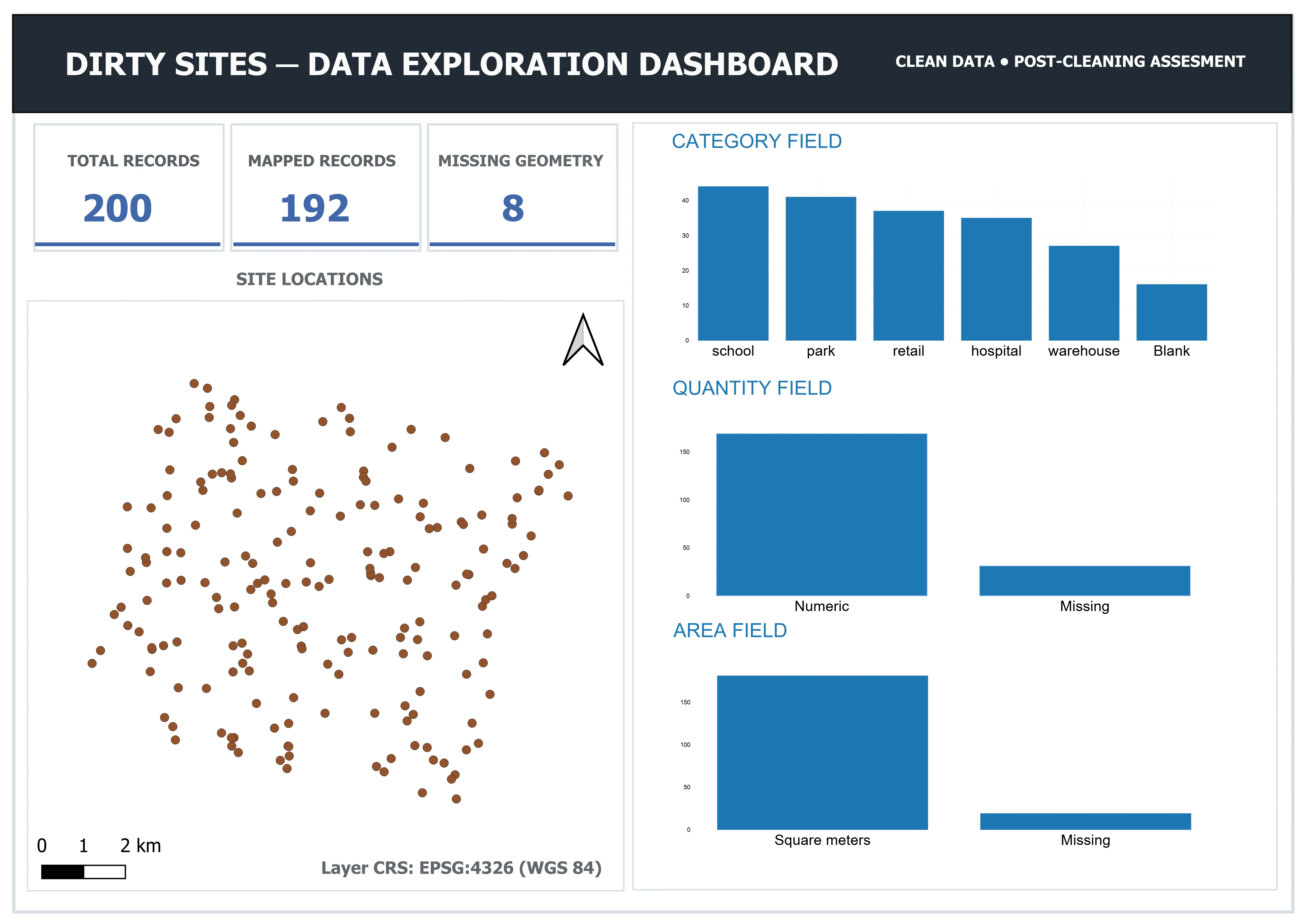
Download the full-resolution dashboard (PDF)
A plugin problem
The QGIS chart plugin (DataPlotly) wouldn’t show a bar for the blank/NULL category, even with “skip NULL values” turned off. This is a known issue in that version of the plugin. Instead of waiting for an update, the view was changed to show 'Blank' as text instead of NULL, just for display. The real NULL value in the table was never touched.
Findings
- The total, mapped and missing-geometry counts (200 / 192 / 8) match the raw dashboard, since the missing coordinates were never meant to be fixed.
categorynow shows 5 clean values plus one “Blank” group (16 records), instead of the raw field’s 26 messy values.quantitynow shows a simple present/missing split (169 / 31), instead of three mixed categories.areanow shows a present/missing split (181 / 19) using the newarea_m2column.
Evidence status
This dashboard is a visual check of the cleaning work. Its numbers come live from database views, so they can’t quietly fall out of sync with the actual table.
Evidence summary
| Field | Problem | Fix | Rows affected |
|---|---|---|---|
| category | Casing, spacing, typos, translations | Standardised to 5 values; blanks set to NULL | 200 checked; 39 changed beyond case/spacing |
| date_collected | 4 mixed date formats | Sorted by format, converted to a real date type | 200 |
| id | Duplicate keys | Replaced using ogc_fid |
21 |
| quantity | Non-numeric or missing values | Flagged, then converted to a number type | 31 flagged/missing |
| price_eur | Bad values; a conversion mistake | Flagged, converted, recovered after a full wipe | 5 flagged; 195 recovered |
| notes | Broken text encoding, spacing | Fixed, trimmed, blanks set to NULL | 2 encoding issues |
| missing coordinates | No coordinates at the source | Confirmed unrecoverable, left as NULL | 8 |
| address | Extra spacing, inconsistent casing | Trimmed, standardised to title case | 200 checked |
| area | Mixed units; field missed at first | Converted to one unit; 19 unrecoverable, flagged | 19 flagged; 200 checked |
Evidence boundaries
This shows that several kinds of data problems can be found and fixed on a working copy of a dataset, that changes can be tested before they are written, and that a real mistake can be recovered from.
It doesn’t show cleaning at a larger scale, or on a live table that other people are using at the same time. The price_eur recovery depended on having an untouched raw copy, and without one it wouldn’t have been possible. Nothing here was automated: every fix was a separate SQL step, not a script. Each field was also cleaned on its own, and fields were not checked against each other for consistency.
The area field shows a real gap in the original plan. It was missed and only caught after the competency was thought to be finished. It is included as it happened, because it is part of how the work was actually checked.
Technical capability demonstrated
This evidence shows the ability to:
- find and measure problems such as inconsistent categories, mixed date formats, duplicate keys, bad numbers, broken text encoding and mixed units;
- test a fix as a read-only query before changing anything;
- keep a record of why a value is missing or invalid, using flag columns, before converting a field to a stricter type;
- trace a problem back to its real cause, even when the symptom shows up somewhere else;
- recover from a real mistake using an untouched backup and a stable ID;
- tell a genuine duplicate apart from two different records that share one value;
- convert mixed units with the correct conversion number and realistic precision;
- notice a gap in the original planning and go back to fix it;
- check results with simple counts and live database views, not just by eye.
This supports demonstrated hands-on capability in data cleaning, including recovery from a real mistake. It doesn’t yet show cleaning at production scale, with automation, or across fields checked against each other.